
Should AI do the whole job, or just help with it? I hear this question in almost every product meeting where AI comes up. Most teams treat it as an either/or choice. In practice, it’s not. It’s a spectrum, and knowing where a task fits changes how you build your product.
I have spent 16 years designing enterprise products, and a lot of my recent work involves AI features. The teams that struggle are rarely short on models or data. They are short on a clear answer to one design question: how much should the machine do, and how much should the person do?
In this post I share the simple model I use. It has two questions, three levels and a few lessons. You can apply it to any AI feature on your roadmap this week.
Why “should AI do the whole job” is the wrong first question
When a team asks “should AI do the whole job?”, they usually picture two options. Either the AI takes over completely, or it sits in a corner as a helper nobody uses. Both pictures are too simple.
Real products contain many tasks. Some are risky. Some are boring. Some need human judgment every single time. A single yes or no cannot cover all of them.
So I break the question down. I never ask whether AI should run the whole product. I ask it for each task inside the product, one at a time.
Two questions decide where a task belongs
Two questions decide where a task belongs:
- How costly is a mistake?
- How routine and predictable is the work?
The first question is about risk. If the AI gets it wrong, what happens? A wrong date format is an annoyance. A wrong pricing recommendation or a wrong capacity plan can cost real money and real trust.
The second question is about pattern. If the work follows the same steps every time, a machine can learn it well. If every case is different and depends on context, a person still needs to lead.
Put those two answers together and you have a working answer to the question: should AI do the whole job for this task? Here’s a simple way to think about it, in three levels.
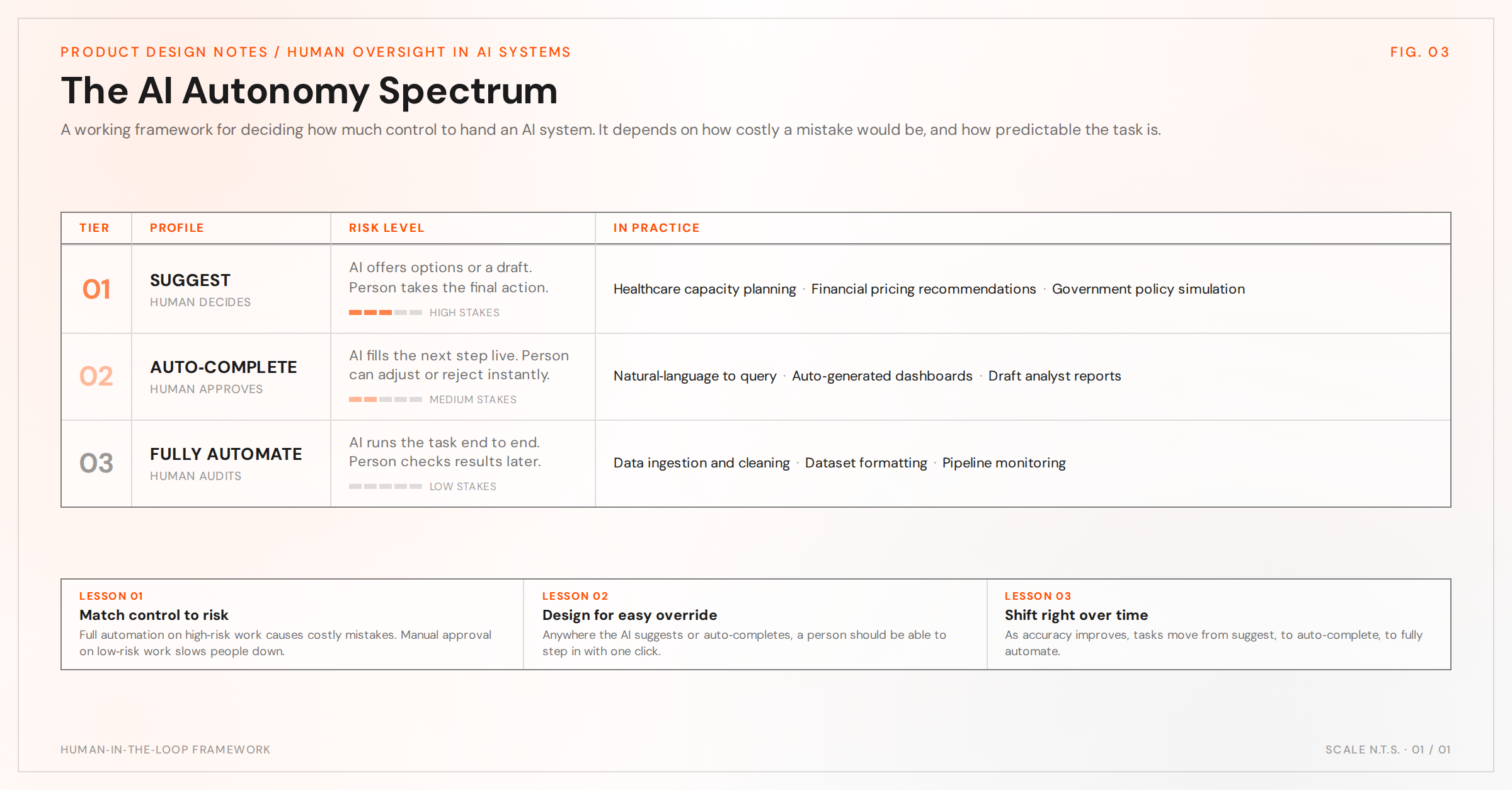
Three levels that answer: should AI do the whole job?
Suggest
For high stakes, judgment-heavy work. The AI offers ideas or drafts. The person decides and takes the final action. Think healthcare capacity planning, financial pricing recommendations, or government policy simulation.
Here the AI is an advisor. It can surface options the person may not have considered. It can save research time. But it never presses the final button. For tasks at this level, the honest answer to “should AI do the whole job?” is no.
The design job is to make each suggestion easy to read, easy to compare and easy to ignore. I also like to show why the AI made a suggestion. A short reason, or the data it relied on, helps the person judge whether to trust it.
Auto-Complete
For medium stakes, fairly predictable work. The AI fills in the next step in real time. The person watches and can accept, tweak, or reject it instantly. Think natural language to query conversion, auto-generated dashboards, or draft analyst reports.
This is the middle ground. The AI moves fast, but the person stays in the loop at every step. The interface needs to make the AI’s work visible as it happens, with clear accept, edit and reject actions placed right next to the content.
If the person has to hunt for the edit option, this level quietly turns into full automation. That is a design failure, not a model failure.
Fully Automate
For low stakes, highly repetitive work. The AI handles the task from start to finish. The person just checks in later. Think data ingestion and cleaning, dataset formatting, or routine pipeline monitoring.
This is where the answer to “should AI do the whole job?” is a clear yes. The task is dull for people, low in risk and easy to check afterwards. Asking a person to approve every step here wastes their time and their attention.
Full automation still needs design. People need a place to see what happened, a summary of what changed and a way to undo or rerun when something looks off.
How I map tasks before deciding if AI should do the whole job
When I run this exercise with a product team, I keep it practical. We list tasks, not features. Then we place each task against the two questions.
- List the tasks. Break each AI feature into the actual steps a person does today.
- Rate the cost of a mistake. Low, medium or high. Ask the people who live with the consequences.
- Rate how routine it is. Does it follow the same pattern most of the time, or does it change case by case?
- Pick a starting level. High cost means suggest. Medium means auto-complete. Low cost and routine means fully automate.
- Design the way out. For every level, decide how the person steps in, corrects or undoes.
This turns a vague debate about “should AI do the whole job” into a short list of clear decisions. I wrote more about tuning this kind of control in my post on the AI autonomy dial. It treats automation as a setting you adjust, not a switch you flip.
A few lessons worth keeping in mind
Match control to risk. Full automation on high-risk decisions causes anxiety and costly mistakes. Manual approval on low-risk tasks just slows people down.
Both mistakes are common, and both erode trust in different ways. One makes people afraid of the product. The other makes them bored of it.
Make it easy to step in. Whenever AI suggests or auto-completes something, the person should be able to override it in one click.
One click means one click. Not a settings page, not a support ticket, not a hidden menu.
Shift right over time. As AI gets more accurate, tasks can move from suggest to auto-complete to fully automate.
Shifting right should be earned. Watch how often people accept, edit or reject the AI’s output. When edits become rare, the task may be ready to move up a level. Should AI do the whole job on day one? Rarely. Should it earn more of the job over time? Often, yes.
Design guidance worth reading
You don’t have to invent this from scratch. Two resources I return to often:
- Microsoft’s Guidelines for Human-AI Interaction cover how AI systems should set expectations, handle errors and support correction.
- Google’s People + AI Guidebook walks through trust, feedback and user control with practical exercises.
Both line up well with the three levels. They also remind me that “should AI do the whole job” is really a question about trust. If you want the bigger picture on how the designer’s role is changing, read my take on the future of UI and UX design in the age of AI, and my guide to AI-native design.
The right amount of automation
The goal isn’t more automation. It’s the right amount of automation for each task.
So the next time someone in a meeting asks “should AI do the whole job?”, answer with two questions of your own. How costly is a mistake? How routine is the work? The answers will tell you whether to suggest, auto-complete or fully automate.
#ProductDesign #AI #HumanInTheLoop #UXDesign #ProductManagement
Planning an AI feature?
If your team keeps asking “should AI do the whole job?” and you want a second opinion on how much your AI should do and where people need to step in, let’s talk. I help teams map tasks, set the right level of control and design the moments of override.
Frequently asked questions
Should AI do the whole job in high-risk products?
Usually not. When a mistake is costly, the AI should suggest and the person should decide. Healthcare planning, financial pricing and government policy work tend to sit at this level.
What does human in the loop mean in UX design?
It means a person can see, approve, change or reject what the AI does. In design terms, it comes down to visible AI output and easy, one-click override actions.
When can a task move from suggest to full automation?
When the AI is consistently accurate and people rarely edit its output. Move one level at a time, from suggest to auto-complete to fully automate, and keep an undo path in place.