

Open almost any product page today and you will find the word “AI-native” somewhere above the fold. It sits on pitch decks, pricing pages and job descriptions. It has become the new “cloud-first,” a label that sounds like strategy but often describes a chatbot added to last year’s product.
I don’t think the word is useless. I think it is unexamined. So in this post I want to give it a plain definition, one test you can run on any product, including your own, and a short look at what AI-native design changes for the people who design these systems.
A label with consequences
Overclaiming AI is no longer just a branding problem. In March 2024 the US Securities and Exchange Commission settled charges against two investment advisers, Delphia and Global Predictions, for what it called “AI washing”: telling clients they used AI and machine learning in ways they did not. The firms paid $400,000 in combined penalties.
Most product teams will never face a regulator over a landing page. But the same thing happens on a smaller scale every day. A buyer expects a system that understands their goal and does the work, and gets a sidebar that summarises a table. The gap between the label and the experience is where trust is lost, and in AI products, trust is what keeps people using them. Good AI-native design starts by closing that gap.
A plain definition of AI-native design
IBM describes AI-native as something “designed from the ground up with AI as a core component,” rather than having AI added later as a feature. I find it useful to keep the definition that short and put the effort into the contrast, because that contrast is where AI-native design really begins.
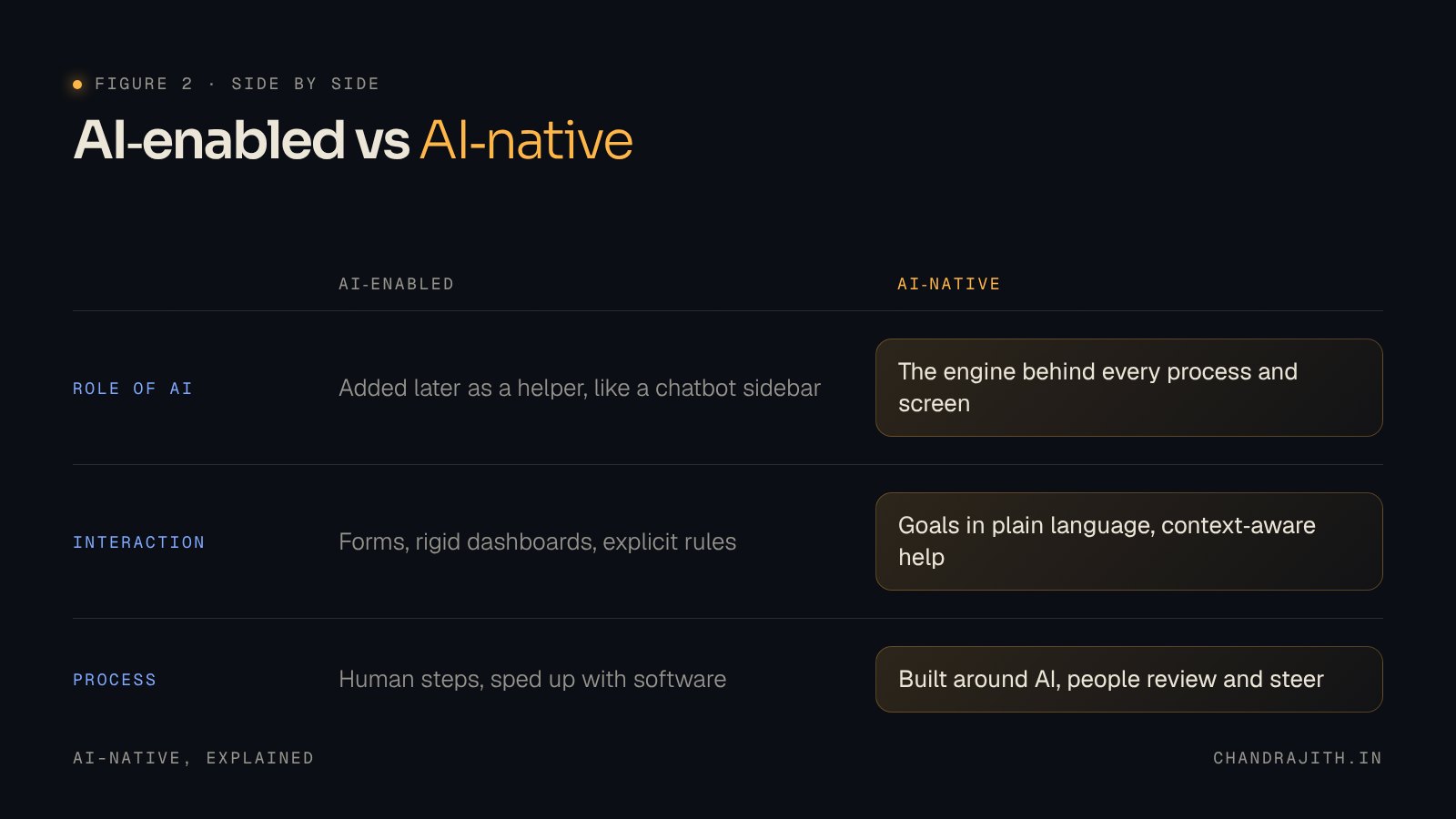
An AI-enabled product was designed around human steps. Forms, menus, dashboards and rules came first. AI was added later to speed parts of it up: a smart reply here, a summary there.
An AI-native product was designed around what AI can do. The workflow assumes the system can understand a goal, reason over messy information and act. People are still there, but they steer, review and handle the exceptions instead of doing every step themselves.
Both are legitimate. The problem only starts when one is sold as the other.
The removal test
Here is the test I keep coming back to, and the one I would ask any vendor, or any team I work with, to answer honestly. It is the first question in any AI-native design review I run.
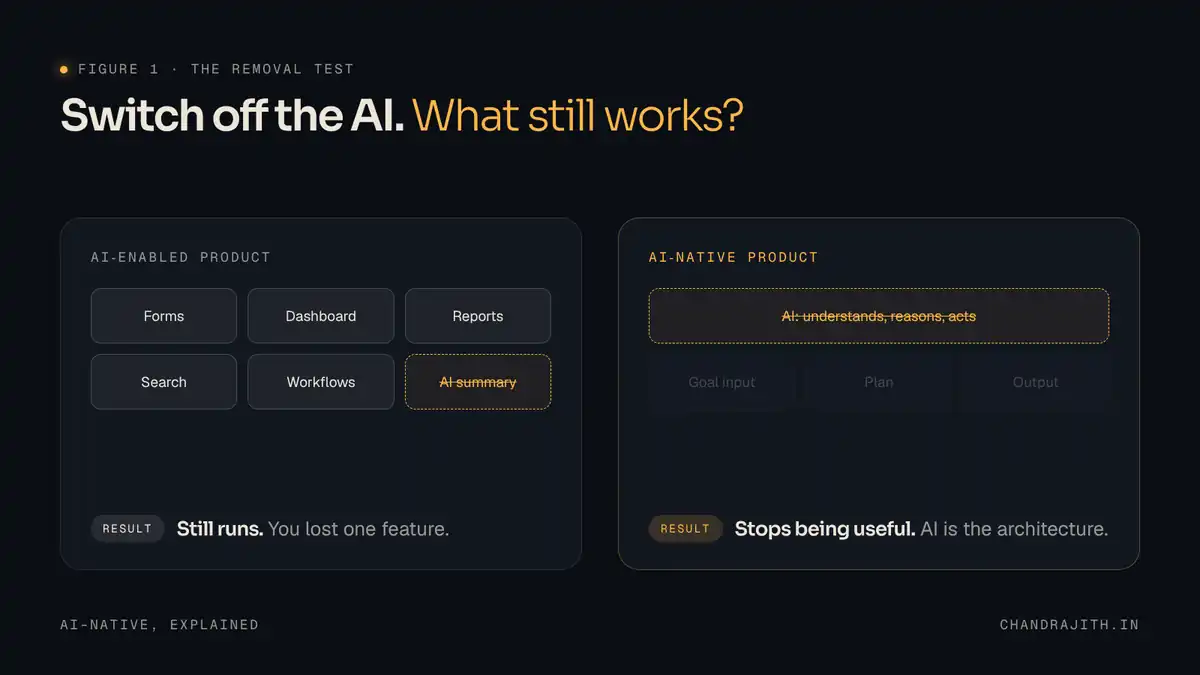
Imagine switching the AI off tomorrow. What still works?
If the product keeps running and you have lost a feature, it is AI-enabled. A CRM that drafts follow-up emails is still a CRM without the drafting. A design tool with an AI image fill is still a design tool.
If the product stops being useful, it is AI-native. An answer engine that reads sources and writes a cited answer has nothing to show without the model. A coding agent that runs from a single prompt, planning and making changes across a codebase, has nothing left to run. The intelligence is not a layer on the architecture. It is the architecture.
The test is blunt on purpose. It cuts through demos, because a good demo can make any feature look central. It is much harder to fake what happens when the feature disappears.
What changes when AI is the foundation
Once AI is the foundation, a few things change at the same time, and they are worth naming because each one has a consequence for AI-native design.
Logic becomes probabilistic. Traditional software follows if/then rules a person wrote in advance. AI-native systems work with unstructured data and produce outputs that vary with context. The same request can give different results, so the design has to plan for variation, not hide it.
The interface becomes intent. Instead of filling in a form step by step, users state a goal in natural language and the system works out how to get there. It drafts, checks and files while the person does something else, so people move from being the engine to being the oversight. That makes the starting point and the hand-back the most important screens, not the ones in between. I wrote about where that line should sit in Should AI Do the Whole Job, or Just Help With It?
Failure looks different. A deterministic system fails with an error message. An AI system can fail while sounding completely confident. That is why visible sources, editable outputs and clear undo paths are not extras in AI-native design. They belong in the first release, not a later one.
What AI-native design means for designers: three layers
For designers, AI-native design is less about new screens and more about new layers to design. It builds on the shift I described in The Future of UI and UX Design in the Age of AI. In this series I am breaking the layers down one at a time, but here is the short version.
- A machine-readable foundation. Tokens, components and interaction rules structured so an AI agent can read them and render the right thing in context, without a static handoff. Solid design patterns make this much easier.
- A reasoning layer. Product principles, tone of voice and constraints that tell the system how to present something, depending on how serious the user’s situation is.
- An autonomy dial. A deliberate decision, task by task, about how much the system may do on its own, based on what happens if it gets it wrong.
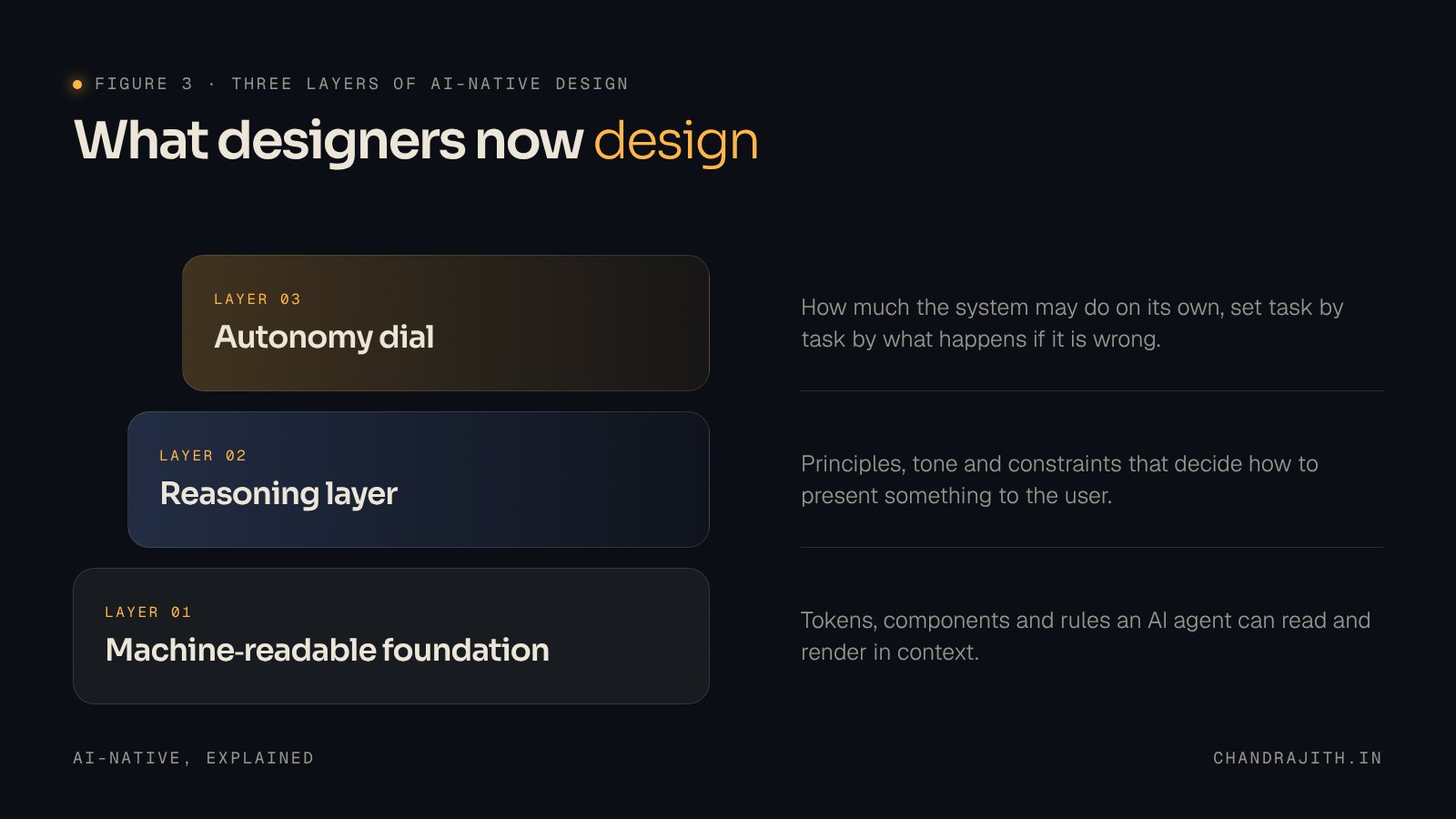
If your design system only covers the first layer, you have a component library that AI can use. You do not yet have an AI-native design system.
A five-question AI-native design self-check
Before you put “AI-native” on your own product, run through these:
- If you switch the AI off, does the product stop being useful?
- Did the workflow start from what the AI can do, or from the screens you already had?
- Can a user start from a goal in plain language, not just a form?
- When the AI is wrong, can the user see why, fix it and undo it?
- Have you decided, per task, how much the system acts alone?
If most of your answers are “no”, that is an honest place to be. It just means you have built something AI-enabled, and you should say so.
The word should mean something
I would rather see fewer products called AI-native and more products that earn it. The removal test is not a ranking. It is a way of being clear about what you have built, so the people using it know what to expect. That clarity is what good AI-native design is for.
Next in this series I will look at the autonomy dial: how to decide how much an AI should be allowed to do on its own. Until then, try the test on the last product you shipped. What still works?
Frequently asked questions
What is AI-native design?
AI-native design is designing for intent, variable outputs and trust instead of fixed screens. It covers a machine-readable design foundation, a reasoning layer of principles and constraints, and deliberate decisions about how much the AI acts on its own.
What does AI-native mean?
An AI-native product is designed from the ground up with artificial intelligence as its core component. Remove the AI and the product stops being useful, rather than just losing a feature.
What is the difference between AI-native and AI-enabled?
AI-enabled products add AI to an existing, human-designed workflow. AI-native products design the workflow around what AI can do, with people reviewing and steering instead of doing every step.
